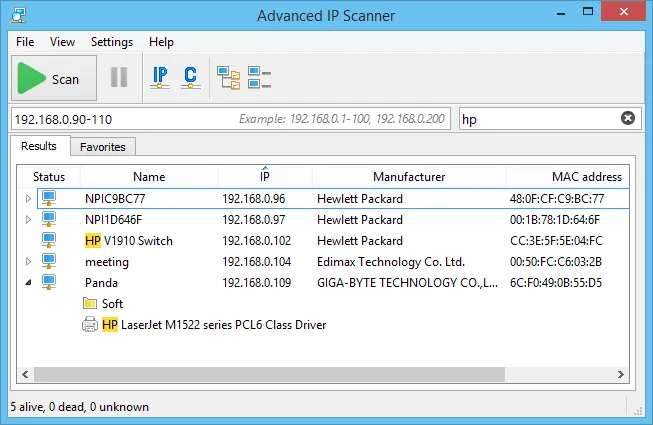
Picture a dental practice that swaps its ISP router on a Friday. By Monday the front-desk label printer has “disappeared,” the X-ray workstation can’t reach its network share, and nobody knows which of the thirty-odd addresses on the new 192.168.0.0/24 range belongs to what. That is the exact moment Advanced IP Scanner was built for: someone with a Windows PC and no networking background needs a trustworthy list of what is plugged in, and needs it before the first patient arrives.
Before you point it at anything: Scan networks you own or manage, or ones you have written permission to survey. Even a friendly ping sweep can trip alerts on a network that isn’t yours.
What it actually does
Advanced IP Scanner is a Windows-only desktop utility from Famatech, the company behind Radmin. You give it an address range — it proposes your own subnet automatically — and it sweeps that range, reporting every host that answers. For each device it tries to fill in:
- IP address and hostname, pulled from NetBIOS and DNS where available
- MAC address and manufacturer, the latter looked up from the MAC’s vendor prefix (OUI)
- Shared folders exposed over SMB, which you can open straight from the result
- Common services such as HTTP, HTTPS, FTP, RDP and Radmin, with one-click shortcuts to open them
Beyond listing, it can send Wake-on-LAN packets and issue a remote shutdown to Windows machines where you hold admin rights. Results can be exported to CSV or HTML, and you can star devices into a Favorites list so the handful you care about stay visible between scans.
On a /24 like that, a full scan typically finishes in under a minute. In a case like this, the printer would turn up with its vendor tag (Brother, say) and a new DHCP address, which explains everything.
Where it is strong
Time to a usable list. No configuration screens stand between you and results. For a non-specialist this matters more than any feature: open it, press Scan, read the table. Vendor names are what make the list trustworthy — “Hikvision,” “Ubiquiti,” “Synology” tell an office manager far more than a raw MAC ever will.
Shares and remote access in one place. Being able to expand a Windows host and see its shares, or click through to a printer’s web page, saves a lot of copying addresses between tools.
Portable use. The setup program offers a “Run” option that starts the scanner without installing anything, handy on a borrowed PC or a client’s machine where you don’t want to leave software behind.
Exports that open cleanly. The CSV goes into Excel or Google Sheets without cleanup, which makes it a reasonable starting point for an inventory. Our walkthrough on building a device inventory spreadsheet uses exactly that export.
Where it falls short, and who should skip it
Windows only. If your admin laptop is a Mac or runs Linux, this is simply not an option. Angry IP Scanner or Fing are the natural substitutes.
Quiet devices can go missing. Discovery leans on ping and a handful of probes. Phones in power-saving mode, some IoT gadgets and hosts with a strict firewall may not answer at the moment you scan. On the same subnet the ARP table helps, but across a router you only see what replies. Scan twice, a few minutes apart, before concluding something is gone.
No history, no alerts. Each scan is a snapshot. There is no built-in way to compare Monday’s list with Friday’s or get notified when a new device joins. If you need that, look at an inventory platform such as Lansweeper, or at Fing’s paid monitoring.
Shallow port information. It checks a short list of well-known services, not arbitrary ports. For a proper look at what a machine is listening on, pair it with Advanced Port Scanner or Nmap.
Radmin nudges. The interface promotes Radmin, Famatech’s commercial remote-control product. The scanner doesn’t require it.
Skip it if you need cross-platform support, scheduled scans, change tracking or anything you would call an audit trail.
Who it suits
Office managers, receptionists-turned-IT, solo technicians visiting small clients, and homelab owners on Windows who want a clean list now and don’t need to repeat it on a schedule.
Licensing and cost
Famatech distributes Advanced IP Scanner as freeware, and at the time of writing the vendor states it may be used in commercial environments as well as at home. There is no paid tier of the scanner itself; the only upsell is Radmin, which is a separate product with its own licensing. Terms can change, so check the vendor’s current license text before rolling it out across a company.
How it compares
Against Angry IP Scanner, it wins on polish and vendor identification out of the box but loses on platforms and scripting; our side-by-side comparison walks through both on the same LAN. Against SoftPerfect Network Scanner, it is simpler and has no device cap, while SoftPerfect goes much deeper into WMI, SNMP and remote queries — see SoftPerfect vs Advanced IP Scanner. If your real question is which shares each account can read or write, LizardSystems Network Scanner focuses on exactly that, though it hasn’t been updated since 2021. The full field is laid out on our IP scanners category page, and the criteria we score against are on the methodology page.
Getting it safely
Advanced IP Scanner is one of the most frequently impersonated utilities on the web: lookalike domains and paid search ads have been used to push tampered copies. Take these precautions:
- Type the vendor’s address yourself — advanced-ip-scanner.com — rather than clicking an ad.
- After you get it from the vendor’s site, right-click the file, open Properties → Digital Signatures, and confirm the signer is Famatech.
- If the vendor publishes a checksum, compare it with
Get-FileHashin PowerShell. - Keep your antivirus on during setup.
We host no files. Our where to get it page lists the vendor site for every tool we cover, plus a short verification checklist.
FAQ
Does Advanced IP Scanner work on macOS or Linux?
No. It is a Windows application. On other platforms, Angry IP Scanner (Java-based, cross-platform) or Fing’s desktop and mobile apps cover similar ground.
Why does a device I know is online not appear?
It probably ignored the probes — common for phones asleep on Wi-Fi and for machines with a host firewall that drops ping. Wake the device, scan again, and check your router’s DHCP lease table as a second source.
Can it scan more than one subnet?
Yes. You can enter several ranges separated by commas, or a larger range. Across routed links you lose MAC addresses and vendor names, because those come from the local ARP table.
Is it safe to run on a production network?
On a network you administer, a ping sweep is light traffic. Still, tell whoever runs security monitoring before you scan, so nobody mistakes your survey for an intrusion attempt.