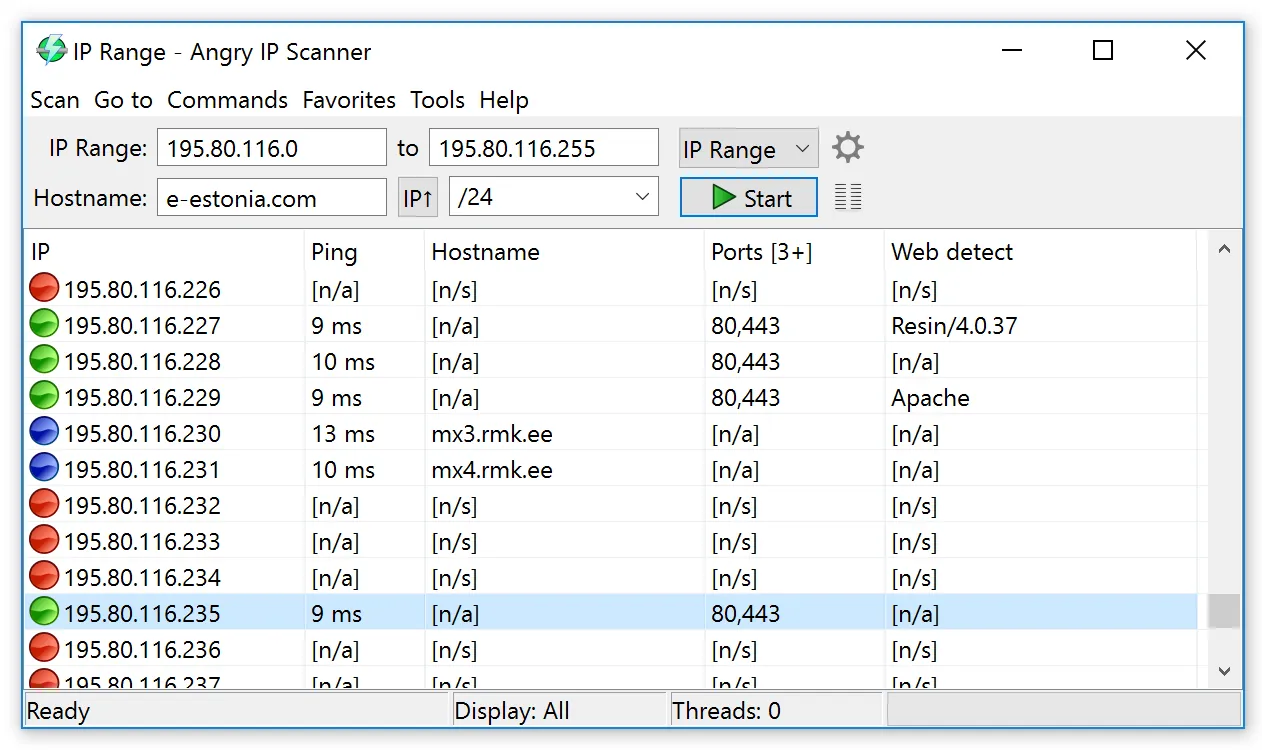
Picture a homelab rack that’s a mess of mismatched machines: a Linux mini-PC running containers, a few Raspberry Pis, a managed switch, a NAS, and a MacBook that does most of the admin work. When a Pi reflashed with a fresh image grabs a new DHCP address and falls off the notes, what you want is one scanner you can run from any of those machines with the same interface and the same export format. That requirement narrows the field fast, and Angry IP Scanner is usually what’s left standing.
Before you point it at anything: Point it at networks you own, manage, or have explicit permission to survey. The tool will happily scan anything you type, so the discipline has to come from you.
What it does
Angry IP Scanner, written by Anton Keks and maintained as an open-source project, is a multithreaded IP and port scanner built on Java. You feed it addresses through one of three feeders — an IP range, a random sample, or a list read from a text file — and it pings each one, then runs a chain of fetchers against the hosts that respond. Out of the box the fetchers cover:
- ping time and TTL
- hostname (reverse DNS)
- open ports from a list you define
- MAC address and MAC vendor (on the local segment)
- NetBIOS information for Windows hosts
- a web detection fetcher that reads the HTTP server banner
You pick which columns appear, so a lean scan is just “IP, ping, hostname” while a fuller one adds ports and vendor. Results export to CSV, TXT, XML or a plain IP:port list. There is also a command-line mode, which means you can run the same scan from cron or a scheduled task and diff the output.
Where it is strong
Genuinely cross-platform. The same tool, same menus, same export format on Windows, macOS and Linux. For mixed-OS teams and homelabs that consistency is worth a lot.
Fast by design. It spins up many threads at once. A /24 on a wired LAN typically finishes in well under half a minute with default settings, and you can tune thread count and timeouts when a slow Wi-Fi segment needs gentler treatment.
Adjustable pinging. When hosts block ICMP, you can switch the ping method to UDP or to a TCP port probe, which catches firewalled Windows machines that would otherwise look offline. This single setting fixes most “missing device” complaints.
Openers. Right-click a result and launch a browser, SSH session, file share or any command you define with the host’s address filled in. Small, but it keeps you in one window.
Transparent source. Being open source under GPLv2 means you can read what it sends on the wire, and companies wary of closed-source network tools can audit it.
Where it falls short, and who should skip it
Less hand-holding. Default columns don’t include MAC vendor or ports until you enable those fetchers in preferences. A newcomer’s first scan can look like a bare list of addresses, which is less reassuring than Advanced IP Scanner’s labeled table. Five minutes in the settings fixes that, but those five minutes are a barrier for some people.
Java baggage. Older releases needed a separately installed Java runtime; newer Windows builds bundle what they need, but on Linux you may still juggle package versions. On macOS, expect to approve the app in Privacy & Security the first time, because it isn’t distributed through the App Store.
Limited identification. MAC vendor is the main clue about what a device is. There’s no fingerprint database like Fing’s, so a generic “Espressif” result tells you it’s some Wi-Fi gadget and not much more.
No inventory features. No history, no change alerts, no asset records. It finds and lists; the rest is up to your spreadsheet.
Security-product false positives. Some endpoint protection tools flag network scanners by category. That’s policy, not malware, but it can mean paperwork in a managed company environment.
Skip it if you want zero configuration on a single Windows PC, or if you need ongoing monitoring rather than on-demand sweeps.
Who it suits
Homelab owners, Linux and Mac admins, consultants who move between client sites on different laptops, and anyone who wants to script a scan and compare results over time. It is also a good fit for people who prefer open-source tools on principle.
Licensing and cost
Angry IP Scanner is free software released under the GNU GPL version 2. There’s no paid edition, no feature lock, and no device limit. Commercial use is fine under the GPL’s terms; if you modify and redistribute it, the license’s source-sharing obligations apply. The project accepts donations but asks nothing in return for using it.
How it compares
The most common head-to-head is with Advanced IP Scanner: Famatech’s tool is friendlier on Windows, Angry IP runs everywhere and scripts better. Our comparison of the two runs both on the same office LAN. If you find yourself tuning ports and timing constantly, you’ve probably outgrown it and should look at Nmap. For a richer Windows-centric view with WMI and SNMP, see SoftPerfect Network Scanner. The whole lineup is on our IP scanners page, and if you’re chasing a duplicate address, the IP address conflict walkthrough uses Angry IP Scanner step by step.
Getting it safely
The project’s own site is angryip.org, and releases are also published on the project’s public code repository, which lets you check that the version number and file names match. After you fetch a release:
- Compare the file against any checksum listed alongside the release.
- On Linux, prefer the .deb or .rpm from the project over random third-party repackages.
- On macOS, confirm the app is the one you expect before approving it in Privacy & Security.
We don’t mirror any files. The where to get it page lists the vendor site for each tool and our verification checklist.
FAQ
Why does Angry IP Scanner show “[n/a]” for MAC addresses?
MAC addresses come from ARP, which only works on your local segment. If you scan across a router or VPN, the scanner sees the router’s MAC or nothing at all. Run it from a machine on the same subnet.
Can it scan ports as well as addresses?
Yes. Enable the Ports fetcher and set a port list in Preferences, for example 22,80,443,445,3389. It is a TCP connect check, good for “is this service listening,” not a deep service analysis.
Does it need administrator rights?
Usually not. ICMP ping may need elevated rights on some Linux setups; switching the ping method to UDP or TCP avoids that.
Is it the same as the “Angry IP” tools on other websites?
Only angryip.org and the project’s linked code repository are the real sources. Repackaged copies from unrelated sites are best avoided.