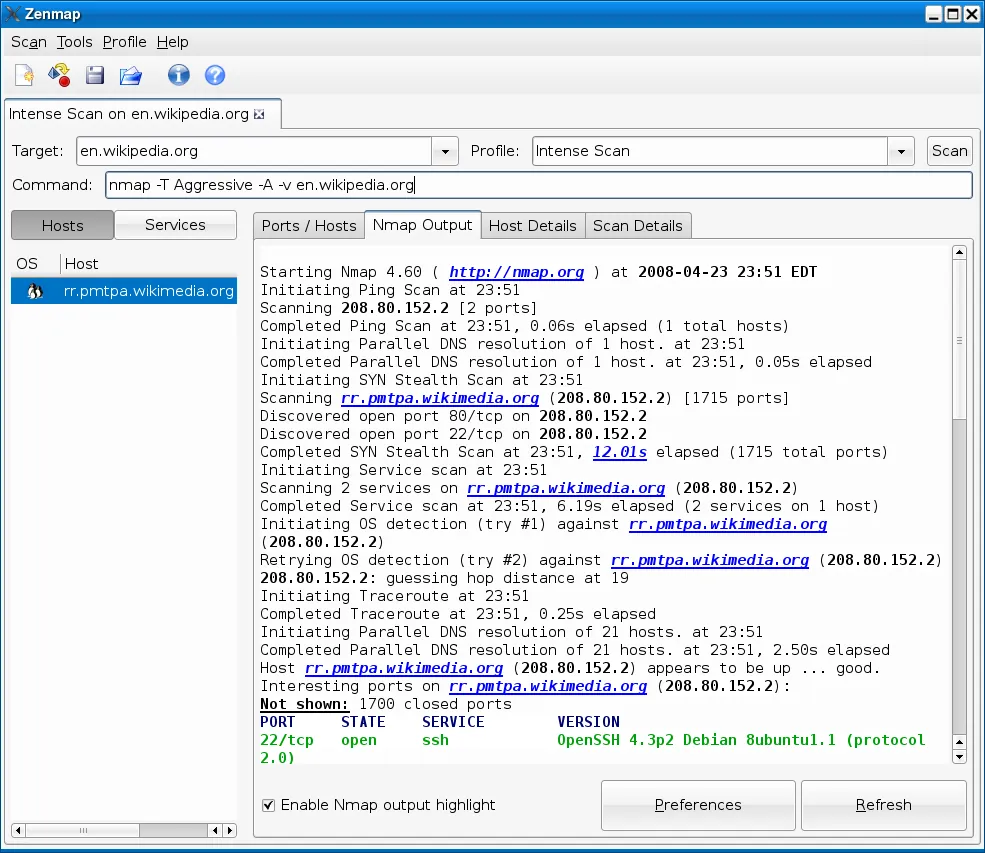
Picture an IT lead who gets the same question every January from the company’s cyber-insurance renewal form: “Confirm that only the services you’ve declared are reachable on your server network.” A screenshot from a GUI scanner doesn’t satisfy that kind of question well. What satisfies it is a scan you can rerun with the exact same parameters, save as a file, and compare to last year’s. That’s the job Nmap has been doing since 1997, and why, despite its reputation for being “for experts,” it belongs in any honest atlas of network-survey tools.
Before you point it at anything: Scan only networks and hosts you own or have explicit, preferably written, permission to assess. Nmap is powerful enough that scanning systems you don’t control can breach acceptable-use policies, contracts and computer-misuse laws. When in doubt, don’t scan.
What it does
Nmap (“Network Mapper”), maintained by the Nmap Project, is a command-line scanner for Windows, macOS, Linux and the BSDs. It ships with Zenmap, a graphical front end that builds commands for you and shows results as tables and a topology diagram. Its main capabilities:
- Host discovery.
nmap -sn 192.168.1.0/24finds which addresses are live without port scanning. On a local segment it uses ARP, which is fast and very hard for a device to ignore. - Port scanning. TCP connect scans (
-sT), SYN scans (-sS, needs admin/root), and UDP scans (-sU). - Service and version detection (
-sV), which talks to each open port and matches responses against a large signature database. - OS fingerprinting (
-O), a best-guess at the operating system from network behavior. - Nmap Scripting Engine (NSE), hundreds of scripts for tasks such as reading SMB details, TLS certificate information or SNMP data.
- Output formats: normal (
-oN), XML (-oX) and grepable (-oG), plus-oAto write all three.
A typical inventory-style run on a network you manage looks like this:
nmap -sn 192.168.1.0/24 -oA survey-2026-09
nmap -sV --top-ports 100 192.168.1.0/24 -oA services-2026-09
ndiff services-2026-03.xml services-2026-09.xml
The last line uses ndiff, bundled with Nmap, to show exactly what changed between two scans — new hosts, closed ports, new versions.
Where it is strong
Trustworthy discovery. On a local subnet, ARP-based discovery catches devices that ignore ping entirely. On a typical home or office subnet, -sn will often turn up a handful of quiet IoT devices that ping-based GUI scanners miss.
Repeatability. Commands are text; outputs are files. You can document exactly how a survey was run and repeat it next quarter. That’s what turns a scan into evidence.
Depth when you need it. Version detection and NSE scripts answer questions GUI tools can’t: which TLS versions a server offers, whether SMBv1 is still enabled, what SNMP community a switch responds to.
Cross-platform and scriptable. Same syntax everywhere, easy to wrap in PowerShell or bash, XML output that other tools can import.
Excellent documentation. The official reference guide and the project’s book are thorough and well written.
Where it falls short, and who should skip it
Steep first hour. The options list is long and flag combinations aren’t obvious. Zenmap helps, but a non-specialist can still produce a scan that’s slow, incomplete or noisy. Start with the Zenmap profiles “Ping scan” and “Quick scan” before improvising.
Easy to be too aggressive. Options like -T5, full-range port scans and some NSE categories generate heavy traffic and can upset fragile devices — old printers, embedded controllers, some medical and industrial equipment. On networks with that kind of gear, scan gently and in maintenance windows.
Security-tool reputation. Endpoint and network security products flag Nmap by name. In a company, get sign-off from whoever owns security monitoring first, or your survey becomes an incident ticket.
Windows needs a capture driver. Raw-packet features on Windows rely on the Npcap driver, which has its own license terms and asks for admin rights.
No inventory database. Nmap produces scan results, not a living asset register. Tracking owners, warranties and software needs something like Lansweeper.
Skip it if you want a device list in the next five minutes and never intend to repeat it — Advanced IP Scanner or Fing will get you there faster.
Who it suits
Sysadmins, network engineers and IT leads who need documented, repeatable surveys of networks they’re responsible for; homelab owners who want to learn properly; and consultants performing authorized assessments under a signed scope.
Licensing and cost
Nmap is released under the Nmap Public Source License (NPSL), which is based on the GNU GPLv2 with additional terms. Using Nmap to scan your own networks, including at work, costs nothing. The additional terms mainly matter to companies that want to embed or redistribute Nmap inside a commercial product; those organizations need an OEM license from the Nmap Project. The Npcap driver used on Windows is licensed separately, with its own conditions for redistribution and larger deployments. Read both license texts on the vendor sites if you’re in any doubt.
How it compares
Next to Advanced Port Scanner, Nmap is harder to start with but far more capable; our Nmap vs Advanced Port Scanner comparison covers when each makes sense. Against Angry IP Scanner, Nmap trades speed of first use for depth and accuracy. Wireshark, from a related open-source tradition, is its natural companion: Nmap tells you what’s listening, Wireshark shows you what’s being said. See our port and service scanners and IP scanners pages for the full picture.
Getting it safely
Get Nmap only from nmap.org. The project publishes cryptographic signatures and SHA digests for each release, and explains how to check them:
- Fetch the release for your platform from nmap.org.
- Verify the GPG signature against the Nmap Project’s published signing key, or compare the SHA-256 digest listed for the release.
- On Linux, your distribution’s package manager is also a trustworthy route, though it may lag behind the latest version.
We host nothing. The where to get it page lists each vendor site with a verification checklist.
FAQ
Is Nmap legal to use?
Using it on networks you own or are authorized to assess is normal, legitimate administration. Scanning systems without permission can breach laws and contracts. Get authorization in writing for anything you don’t own.
What’s the gentlest useful scan for a small office?
nmap -sn on your subnet to list live hosts, then nmap -sV --top-ports 100 on the addresses you care about. Avoid aggressive timing on networks with older equipment.
Do I need Zenmap?
No, but it’s a good way to learn. It shows the command it generates, so you can copy it into scripts later.
Why does Nmap find devices other scanners miss?
On a local subnet it uses ARP requests, which devices have to answer to function on the network, rather than relying on ping replies they can ignore.